Agartha Mog or Die Controls
HUD, movement, the Codes icon, and the taps that start a fight you did not want.
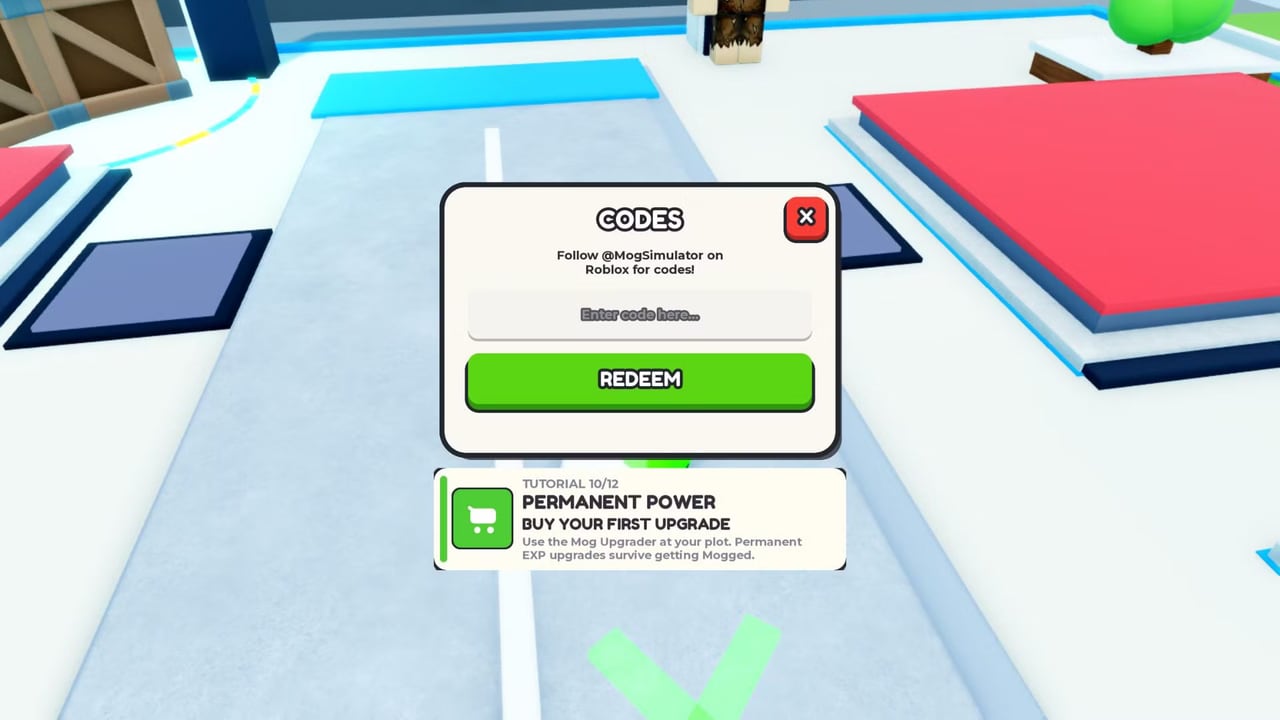
Agartha Mog or Die uses standard Roblox movement plus a small set of experience-specific HUD buttons. There is no public custom keymap from Build a Ore Farm, and the client does not ship a unique action-combat bar. If a bind feels wrong, it is almost always the Roblox escape menu or a tutorial card covering a tap target. This page lists what you actually press, where the Codes window lives, and how to stop accepting Mog Battles while you are picking up Milk.
If you have not spawned yet, read Getting Started first so the HUD names match what you see.
PC defaults
- WASD — walk the suburban map.
- Space — jump onto pads, fences, and the odd roof milk spawn.
- Right mouse — camera. Keep the camera high enough that you can see cartons on the pavement.
- Left click — interact with world drops, plot buttons, NPC prompts, and the Codes field.
- Shift — Roblox sprint if enabled on your account. Not a special mog ability.
- Esc — Roblox menu. Use it to leave, adjust volume, or check that you joined the right experience.
The important custom control is the Codes / hash (#) button at the top left. It opens the cream CODES modal with the @MogSimulator hint, the paste field, and the green REDEEM button. Full click order is on how to redeem. If the button ignores the first click, you are still in a teleport fade or a tutorial lock.
Plot buttons sit on your pad. The Mog Upgrader is the one tutorial 10/12 forces you to notice. Click it on purpose. Do not confuse it with an NPC challenge prompt standing on the same color tile.
Mobile
The virtual joystick moves you. The jump button is the usual Roblox thumb circle. The Codes control is still top left, but your left thumb will clip it if you grip high. Move the grip down before a redeem session so you do not close the modal with a stray swipe.
World pickups are tap-to-collect. That is good until a battle prompt appears over a carton. If you are farming, rotate the camera so other players’ pads are off-screen. Accidental challenges are the number one mobile wipe. After a mistaken accept, you still have SPARE/MOG rules — you do not get a “cancel because I fat-fingered it” button. The Mog Battle guide is the damage-control page.
The on-screen keyboard covers Redeem. Dismiss it, then tap the green button. Autocorrect will try to “fix” tyfor1.5klikes. Paste from notes.
Console
Use the Roblox cursor to hit HUD buttons. Movement is the left stick, camera the right stick, jump the south face button on a standard layout. Codes and Upgrader are cursor clicks, not unique bound actions. If the cursor cannot reach the top-left Codes icon, nudge the camera so the HUD is not letterboxed behind a chat panel.
Tutorial and overlay conflicts
The twelve-step tutorial puts cards in the middle of the screen. Step 10’s permanent-power card can sit on the Codes field and on the Upgrader. Clicks go to the card, not the button you wanted. Close or complete the card, then retry. This is also documented on the redeem guide because it is the main reason people think codes are broken.
Welcome UI uses a large START PLAYING! button. After that, plot signs that read NO NPC PLACED are not buttons you need to mash. They update when you capture someone. See NPCs.
Chat, emotes, and screenshots
Roblox chat is the slash-to-chat default. It has no code parser. Pasting Update2 into chat does not redeem it. Emotes are cosmetic. They do not raise Face. The compare uses the four stats, not your favorite dance.
Screenshots are how people lie to themselves about Height. If you need a real check, look at the sheet and at the stat tier list, not at a forced camera angle.
Accessibility and comfort
There is no first-party colorblind mode unique to this experience. Face/Frame/Height/Bodyfat icons on the welcome card are already color-coded (purple, green, blue, orange). If those colors collide for you, remember the left-to-right order on the card rather than the hue.
If the HUD scale is tiny on a phone, Roblox’s system settings help more than anything in Agartha Mog or Die itself. Do not hunt for a missing in-game settings tab that other tycoons have. This client is thin.
Learn two things and you are done: where Codes lives, and how not to accept a fight while looting. Everything else is walking, tapping pickups, and visiting the Upgrader — the same verbs as how to play.
Frequently Asked Questions
Quick answers for SUB5 players climbing toward Mog King.
Where is the Codes button?
Top left. It may be labeled Codes or shown as a hash icon. Both open the modal in how to redeem.
Is there a unique combat key?
No. Challenges are HUD prompts. Movement is standard Roblox. See Mog Battles for the compare, not for a hotkey.
Why did I start a fight while collecting Milk?
The challenge prompt overlapped a pickup. On mobile, keep other pads off-camera while you farm.
Can I rebind keys inside Agartha Mog or Die?
Not with a first-party in-game keymap. Use Roblox’s own settings, then return to the how to play loop.