How to Redeem Agartha Mog or Die Codes
Exact UI steps for the Codes modal, @MogSimulator hint, and failed-redeem fixes.
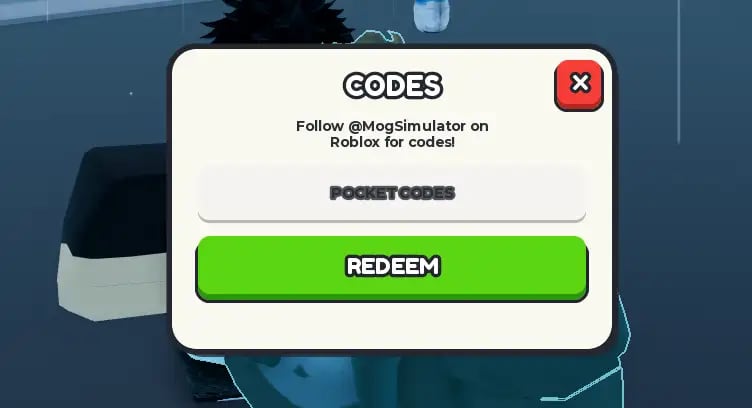
Redeeming codes in Agartha Mog or Die takes less than a minute once the UI is loaded, but the window sits under a tutorial overlay for a large part of a new account. Players miss rewards because they type from memory, redeem during a loading hitch, or tap Redeem while the tutorial card still covers the text box. This page is the click path. Keep the live code list open in another tab and paste, do not retype.
The game is live on Roblox for PC, mobile, and console clients. The Codes modal looks the same on all of them: a cream card titled CODES, a hint to follow @MogSimulator on Roblox, a single text field, a green REDEEM button, and a red close icon. Dexerto documents a hash (#) control at the top left. Pocket-Codes and in-session screenshots show a Codes button in the same corner. Both refer to the same entry point.
Step-by-step on PC
- Join Agartha Mog or Die and wait until your character stands on the plot. Do not open Codes during the teleport fade.
- Finish or pause the welcome flow far enough that the HUD is clickable. The getting started guide explains the twelve tutorial beats. Step 10 can spawn a “Buy your first upgrade” card at the same time as the Codes window.
- Click the Codes button or # icon at the top left.
- Click the field that reads “Enter code here…” so the cursor is actually in the box.
- Paste one string from the codes hub. Example:
tyfor300likes. - Click REDEEM. Wait for MogPoints, Lucky Spins, or the 2x timer to appear before you paste the next string.
- Repeat for
tyfor1.5klikes,Update2, andextracode. - Close the modal and go collect. A 2x buff is wasted in the menu.
Step-by-step on mobile
Mobile uses the same modal, with larger tap targets. After spawn, tap the top-left Codes control. If the on-screen keyboard covers Redeem, dismiss it and tap the green button. Paste from your notes app rather than typing on a touch keyboard — tyfor1.5klikes is the code most often broken by autocorrect.
Console players open the same UI with the on-screen cursor. Paste if your overlay supports it; otherwise type slowly and confirm the dot in tyfor1.5klikes.
The tutorial overlay trap
Around tutorial 10/12 the game asks you to use the Mog Upgrader on your plot. The card reads “Permanent EXP upgrades survive getting Mogged.” That card can sit on top of the Codes field. If Redeem does nothing, close Codes, finish or skip the overlay, then reopen. Do not mash Redeem through an overlay — the client often eats the click.
This overlay is also a reminder: spend the MogPoints you just received on plot power before you walk into a Mog Battle. Timed 2x progress from Update2 and tyfor300likes does not survive a wipe. Upgrader purchases do.
Case, spaces, and order
Codes are case-sensitive. Update2 is not update2. tyfor300likes is not tyfor300Likes. Do not add spaces before or after the string. Do not wrap codes in quotes.
Order does not matter for unlocking, but it matters for your clock. Redeem the Lucky Spin codes (tyfor1.5klikes, extracode) whenever. Redeem the 2x codes only when you can play. If you must AFK, leave the 2x strings for later in the same session so the timer does not burn in the lobby.
Failed redeem checklist
- Confirm the string is still on the working list and not on expired codes.
- Copy again. A hidden newline from a chat app will fail the parser.
- Wait five seconds after spawn. Some HUD buttons ignore the first click.
- Leave and rejoin the experience if the modal will not open.
- Check the updates hub — a patch can retire a like-goal code the same afternoon it ships.
If every live code fails, the issue is the client, not the list. Rejoin, then test a single string.
After a successful redeem
Open your currency and buff UI. You should see MogPoints from tyfor300likes and a 2x label from either that code or Update2. Walk the item route immediately: Milk for Height, Hammers for Face, Picture Frames for Frame, Water for Bodyfat. Then stop at the Mog Upgrader. Only after plot insurance should you look at NPC fights or the Mog King plan.
Codes are free. The only way to waste them is to redeem a 2x window and then stand still, or to gift a doubled run to the first player who challenges you. Paste, collect, upgrade, then fight.
Frequently Asked Questions
Quick answers for SUB5 players climbing toward Mog King.
Where is the Codes button in Agartha Mog or Die?
Top left of the HUD. It may look like a Codes label or a hash (#) icon. Both open the same modal described on this page.
Why does Redeem do nothing?
The tutorial overlay from step 10 often covers the field. Close the modal, clear the overlay, paste again from the codes hub.
Are codes case-sensitive?
Yes. Paste them. Autocorrect on mobile breaks tyfor1.5klikes more than any other string.
Should I redeem 2x codes if I only have five minutes?
No. Save Update2 and the 2x half of tyfor300likes for a session where you can run the growth guide for the full timer.